Start from a Slack message
Choose Send with ReadyInk on any message with a PDF. Add the signers and pick all at once or one after another.

The ReadyInk Slack app turns a PDF in any Slack message into a signature request. Review it in readyink.ai, send it, then follow every signature in the same Slack thread until the document is completed.
By the ReadyInk team · Updated
Choose Send with ReadyInk on any message with a PDF. Add the signers and pick all at once or one after another.
A status card in the thread shows the document title and how many people have signed, from sent to completed.
Nudge anyone who still needs to sign without leaving Slack. Reminders are free.
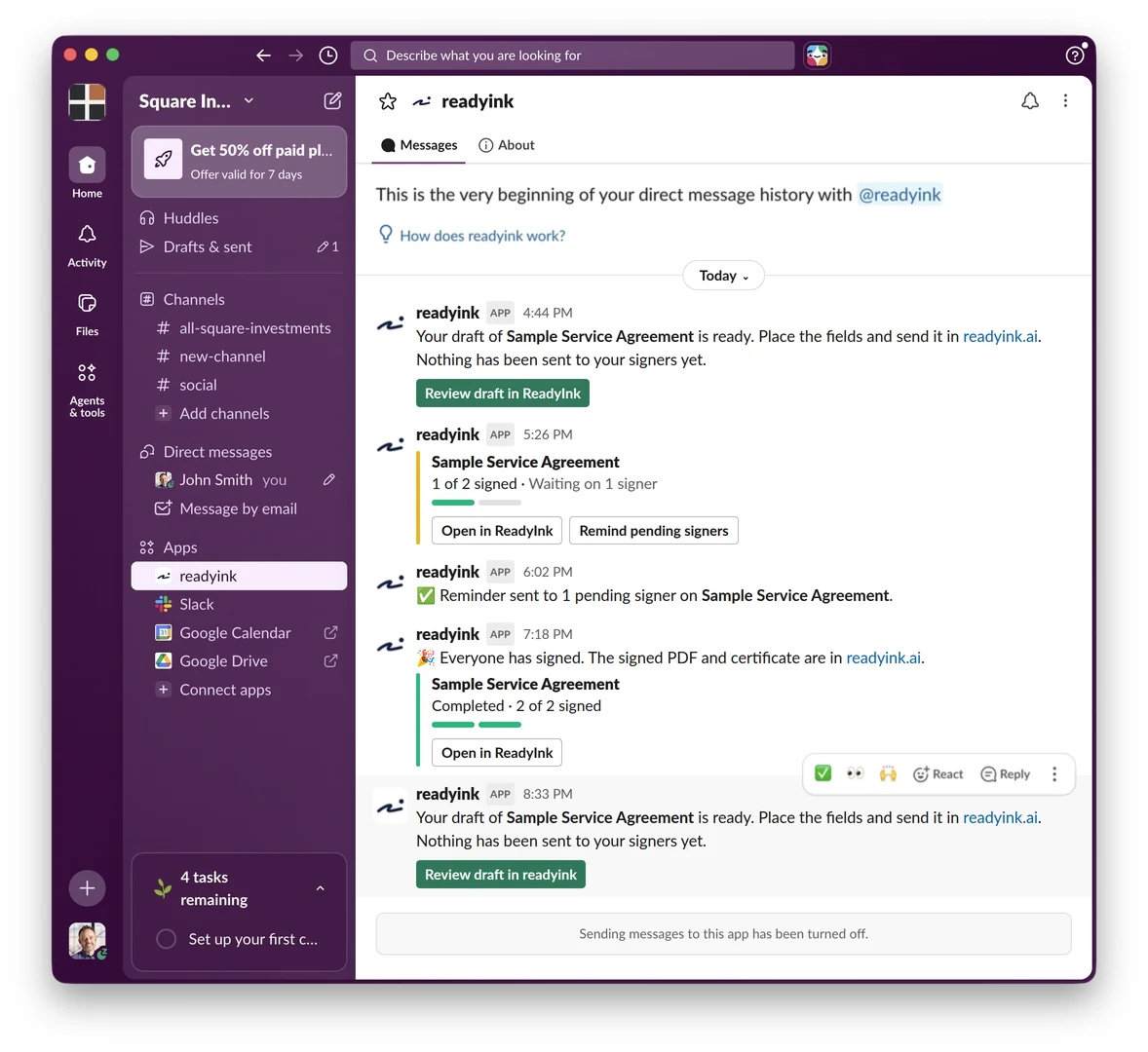
To send documents for signature in Slack, choose Send with ReadyInk on a message with a PDF, add the signers, then review and send the draft in readyink.ai. A status card in the thread shows who has signed, and you can remind pending signers from Slack. The app is free; sends use 1 token per signer.
Contracts, NDAs and quotes often arrive in Slack first, as a PDF someone drops in a channel or a direct message. The ReadyInk Slack app lets you send that PDF for e-signature from the message itself, so the request starts where the conversation already is.
In thread mode, ReadyInk posts one card that stays up to date from sent to completed. It shows the document title and signer counts, with Open in ReadyInk and Remind pending signers buttons. The card never shows signer email addresses, signing links or the document itself, and document links still need a readyink.ai sign-in.
Prefer to keep it to yourself? Choose Only me and the updates come to you in a private message from the ReadyInk app instead.
When someone is slow to sign, choose Remind pending signers on the card. ReadyInk shows who is still eligible for a reminder, then sends it only to people who haven't signed and whose turn has come. Anyone who signs in the meantime is skipped automatically. Reminders don't use tokens.
The Slack app is free on every plan. Documents you send from Slack use tokens the same way as the app: one token covers one signer on one document, however many fields they sign. Copy recipients and reminders are free, and token packs start at $10 for 20 tokens. Signers don't need Slack or a ReadyInk account. They sign from a link in their browser on any device.
Slack sits alongside the rest of the readyink.ai integrations: Google Docs, Dropbox, Zapier, Claude and ChatGPT through the MCP server, and the eSignature API with webhooks for your own software.
An owner or admin connects your Slack workspace from Integrations in readyink.ai. If your Slack workspace limits which apps people can add, a Slack admin may need to approve it; Slack's guide to apps in Slack explains how app approval works. For a full walkthrough, read how to send documents for signature in Slack.
Yes. Choose Send with ReadyInk on a Slack message with a PDF, add the signers, then review and send the draft in readyink.ai. A status card in the thread, or a private message, shows who has signed.
No. Signers get a secure link by email and sign in their browser on any device. They don't need Slack or a ReadyInk account.
An owner or admin of your readyink.ai business connects one Slack workspace. Each teammate then links their own Slack user to their readyink.ai account the first time they use it.
No. ReadyInk only acts when someone chooses Send with ReadyInk, and it only downloads the PDF they pick. Status cards show the document title and signer counts, never email addresses or signing links.
The Slack app is free. Documents sent from Slack use 1 token per signer, the same as the app, and reminders are free.
Create your ReadyInk account in seconds. Start with a $10 token pack or set up your team.